How to build your own STUN/TURN server on AWS
Self-Hosting a STUN/TURN Server on AWS EC2: Guide
I recently built a peer-to-peer file transfer app Byte Tunnel using WebRTC. Direct connections worked fine when both devices sat on the same Wi-Fi. The moment one device went on cellular data, transfers would never connect and the status would either be "Establishing Connection" or "Interrupted".
The fix is a TURN server - a publicly-reachable relay that bounces traffic between peers who can't talk directly.
I didn't want to use a paid service like Twilio, and I had an AWS account with free tier credits.
This post walks through everything: what STUN and TURN actually do, how to set up coturn on EC2, the dozen things that went wrong along the way, and the things tutorials never warn you about.
What STUN and TURN actually do
When two browsers want to connect P2P over WebRTC, they need each other's reachable network addresses. Most devices sit behind NAT (your router has one public IP, and your device has a private IP) that the public internet can't see directly.
STUN (Session Traversal Utilities for NAT) is a simple protocol where your device asks a public server "what IP do you see me coming from?" The server replies with your public IP and port. This is enough for most P2P connections. Both peers swap their STUN-discovered addresses through a signaling server and try to connect directly.
TURN (Traversal Using Relays around NAT) is a fallback for when STUN is futile. Some NATs (like carrier-grade NAT used by many cellular providers) actively block incoming (hole-punched) connections. When direct P2P fails, TURN acts as a middleman. Both peers connect to the TURN server, and it relays bytes between them. Every byte of your transfer flows through the relay.
STUN is often plenty for most home-to-home connections. However, you can't predict whether your users will need TURN, so you need to provide it as a fallback.
Google operates free public STUN servers (stun.l.google.com:19302) that anyone can use. But there are no free public TURN servers worth using. TURN costs real bandwidth to operate, so providers charge for it. Hence, self-hosting.
What you'll need
An AWS account (free tier eligible for the first 12 months)
A domain isn't strictly required, an IP works
Familiarity with SSH and editing config files
Ubuntu 24.04 LTS
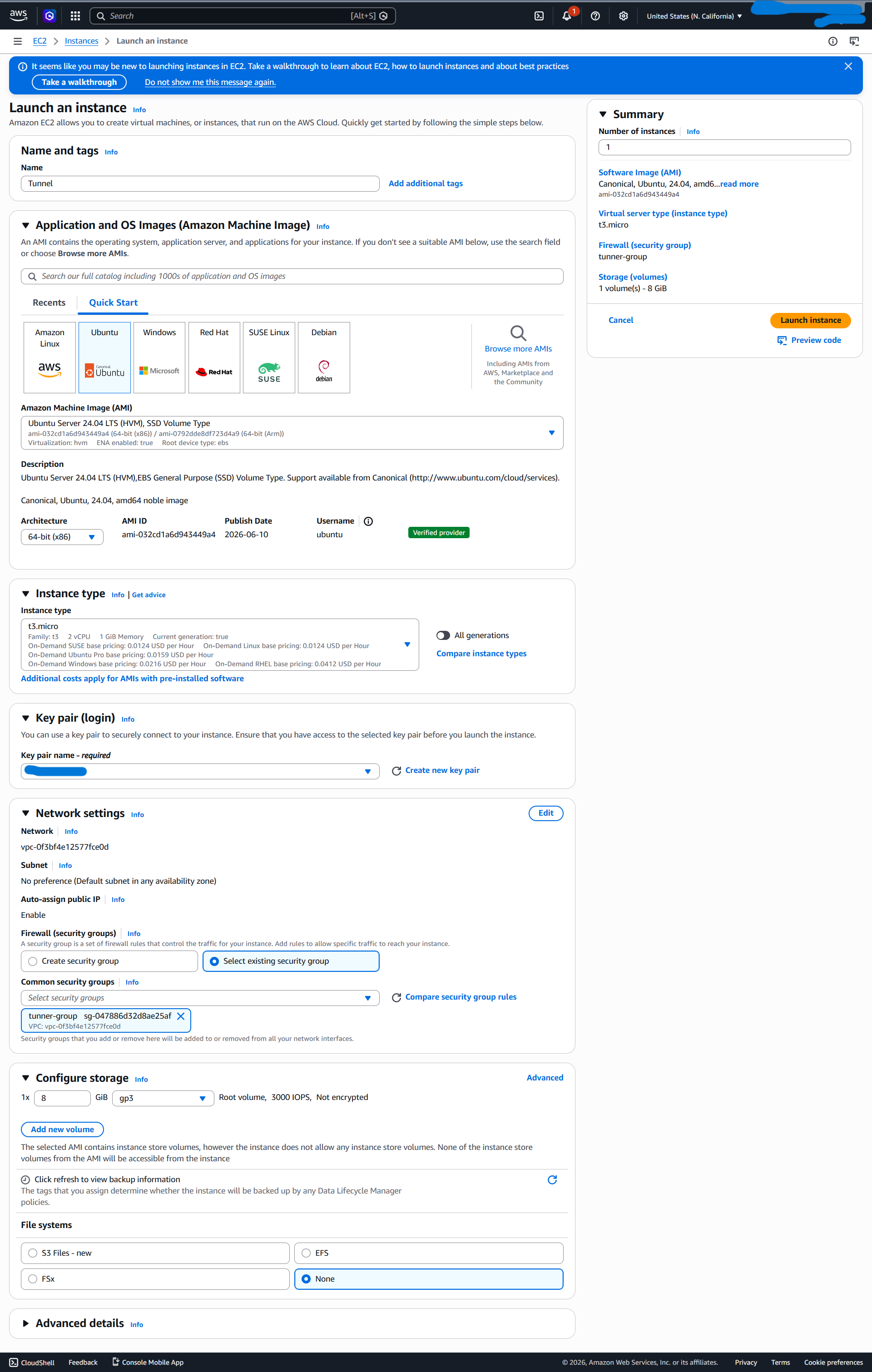
Launch the EC2 instance with these settings:
AMI: Ubuntu Server 24.04 LTS (free tier eligible)
Instance type:
t3.micro(free tier) ort3.nano(~$4/month if past free tier)Auto-assign public IP: Enable
Storage: 8 GB default is enough
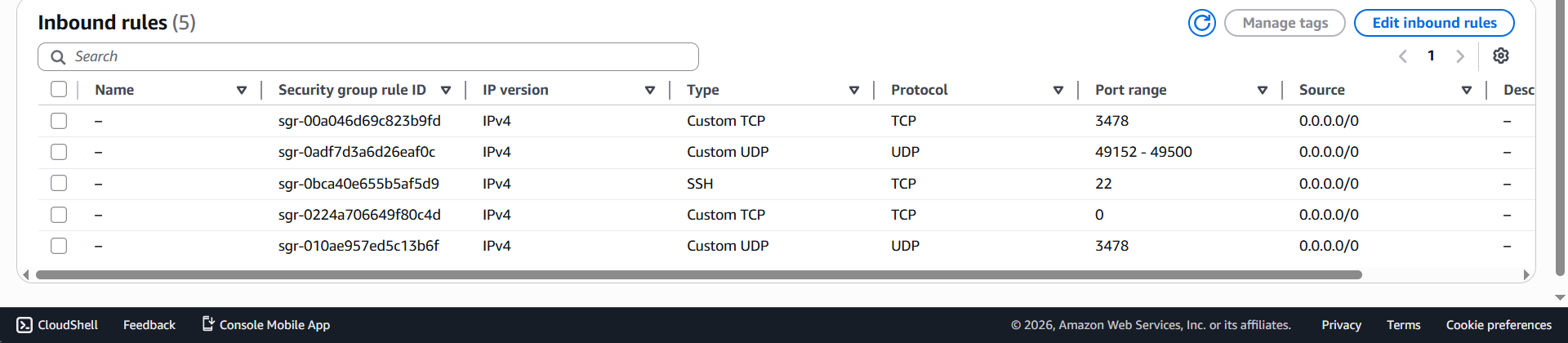
For the security group, this is where most tutorials go wrong. They tell you to open port 3478 and call it a day. You actually need three rule groups:
Type | protocol | port range | source |
|---|---|---|---|
SSH | TCP | 22 | My IP |
Custom TCP | TCP | 3478 | 0.0.0.0/0 |
Custom UDP | UDP | 3478 | 0.0.0.0/0 |
Custom TCP | TCP | 5349 | 0.0.0.0/0 |
Custom TCP | TCP | 5349 | 0.0.0.0/0 |
Custom UDP | UDP | 49152-49500 | 0.0.0.0/0 |
TURN allocates relay ports in a high-numbered range (default 49152-65535, but I narrowed it). When peer A asks the TURN server to relay traffic, the server allocates a port from this range and tells peer B to send traffic there. If that port isn't reachable from the internet, peers authenticate successfully but actual relay never works and you're left wondering why a "working" TURN server doesn't relay anything.
ssh -i your-key.pem ubuntu@<your-ec2-public-ip>Install coturn:
sudo apt update
sudo apt install -y coturn
The configuration that actually works
The default /etc/turnserver.conf is almost entirely commented out. If you start it as-is, coturn runs but binds only to localhost — useless from the public internet. Here's a working minimal config:
# Network - listen on all interfaces, advertise the public IP
listening-port=3478
listening-ip=0.0.0.0
external-ip=<YOUR-EC2-PUBLIC-IP>

# Relay port range - must match the AWS security group rule
min-port=49152
max-port=49500

# Authentication  -  long-term credentials
lt-cred-mech
user=tunneluser:<a-long-random-password>
realm=tunnel

# Defaults
no-multicast-peers
no-loopback-peers
no-cli
no-tls
no-dtls
fingerprint
Two settings are critical and easy to get wrong:
external-ip tells coturn what address to hand back to clients when allocating relays. Without it, clients receive the EC2's private IP (172.31.x.x), which is unroutable from the public internet. coturn keeps working but never actually relays. Set this to your EC2's public IP.
min-port/max-port must exactly match what you opened in the security group. If they don't align, clients can authenticate but allocation succeeds on ports the security group is dropping.
Generate a strong password:
openssl rand -hex 32Use the output as your TURN password.
After editing the config, enable and restart:
sudo sed -i 's/#TURNSERVER_ENABLED=1/TURNSERVER_ENABLED=1/' /etc/default/coturn
sudo systemctl enable coturn
sudo systemctl restart coturn
Verify it's actually listening on all interfaces (not just localhost):
sudo ss -tulpn | grep 3478You should see entries with 0.0.0.0:3478 for both TCP and UDP. If you only see 127.0.0.1:3478, your listening-ip directive didn't apply. Re-check the config.
Testing your TURN server
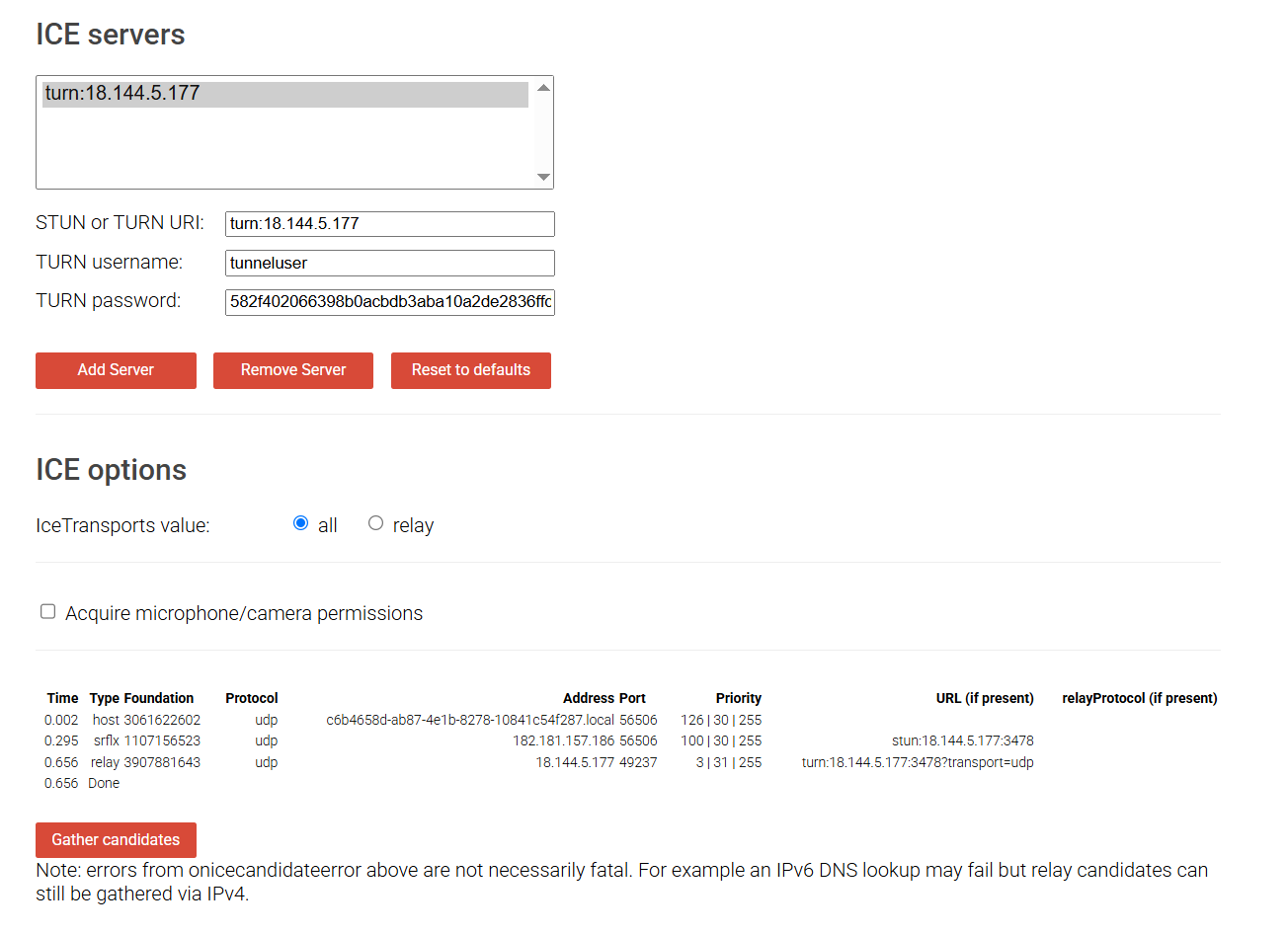
The gold-standard test tool is Google's WebRTC trickle-ice page: Peer Connection Test
Remove any default STUN entries. Add yours:
STUN or TURN URI:
turn:<your-ec2-ip>:3478TURN username:
tunneluserTURN password: your long random password
Click "Add Server" then "Gather candidates". The result table should show at least one row with Type: relay and an address matching your EC2's public IP.
If you see a relay candidate — congratulations, your TURN server works.
If you only see host and srflx (no relay), tail the coturn log live in another terminal:
sudo journalctl -u coturn -fClick "Gather candidates" again and watch what happens. Common outcomes:
No log lines appear: traffic isn't reaching the server. AWS security group is blocking port 3478, or you're testing the wrong IP.
error 401: Unauthorizedwith no subsequent success: credentials don't match between the config and what you typed.ALLOCATE successbut trickle-ice shows no relay candidate: yourexternal-ipdirective is missing or wrong.
Using it in your code
In your WebRTC code, add the TURN server to your RTCPeerConnection config
const pc = new RTCPeerConnection({
  iceServers: [
    { urls: 'stun:stun.l.google.com:19302' },
    {
      urls: 'turn:<your-ec2-ip>:3478',
      username: 'tunneluser',
      credential: '<your-password>',
    },
    {
      // TCP fallback for networks that block UDP
      urls: 'turn:<your-ec2-ip>:3478?transport=tcp',
      username: 'tunneluser',
      credential: '<your-password>',
    },
  ],
});
WebRTC tries each server in order: direct connection first, STUN-discovered next, TURN as last resort. The TCP variant kicks in when corporate firewalls or carrier NAT block UDP entirely.
The thing nobody warns you about: credentials are public
If you ship a static web app with hardcoded TURN credentials, anyone who views your site source can extract them and use your TURN server for their own traffic. They'll be using your AWS bandwidth for free.
For personal projects this is usually fine. The risk is small if you're not advertising the URL. But the proper fix is time-limited HMAC credentials:
coturn runs in
use-auth-secretmode with a shared secretYour backend (in my case a Cloudflare Worker) generates short-lived credentials when clients ask
Username is
<expiry-timestamp>:<identifier>, password is HMAC-SHA1 of the username signed with the secretcoturn validates by re-computing the HMAC
Even if extracted from network traffic, the credentials expire in ~10 minutes and can't be regenerated without the shared secret. This is the same pattern Twilio, Xirsys, and other commercial TURN providers use internally.
The thing tutorials really gloss over: location matters
I deployed my TURN server in us-west-1 (Northern California) because that was the default. Then I tried transferring files between two devices in Pakistan and watched them crawl at a few KB/sec.
This is physics, not a config bug. When TURN is in the path, every byte of your file travels:
Pakistan → 24,000 km of undersea cable → California → 24,000 km back → PakistanRound-trip time is ~700ms. WebRTC's data channel uses something similar to TCP under the hood, so effective bandwidth is capped at window_size / RTT even with infinite real bandwidth, the latency throttles throughput.
If your users are concentrated in one region, host TURN in the nearest AWS region to them.
Pakistan users to ap-south-1 (Mumbai).
European users to eu-west-1 (Ireland).
Australian users to ap-southeast-2 (Sydney).
The improvement from "across an ocean" to "same continent" is typically 5-10× throughput.
What it costs
For my personal use, this setup runs at essentially zero cost:
EC2
t3.micro: free for 12 months, then ~$7/month30 GB EBS storage: free tier covers 30 GB
Bandwidth: free tier includes 100 GB outbound/month
Elastic IP: free while attached to running instance
Past free tier, you'd be looking at maybe $10-12/month plus bandwidth ($0.09/GB outbound). For a typical personal P2P app where TURN is only the fallback, you might relay 1-5 GB a month, call it $13/month all-in.
By comparison, Twilio's TURN service is $0.40/GB with no monthly fee. For under ~25 GB/month, Twilio wins economically. For more than that or for projects with sustained traffic, self-hosting wins.
Verifying everything works end-to-end
If you've followed along and want to validate your full setup:
coturn is running:
sudo systemctl status coturnshows active.Ports are listening publicly:
sudo ss -tulpn | grep 3478shows0.0.0.0:3478.Security group allows the right ports: TCP/UDP 3478, TCP/UDP 5349, UDP 49152-49500.
trickle-ice shows a relay candidate: external-ip is correctly configured.
Logs show successful allocations during real connections:
sudo journalctl -u coturn -fwhile running your app.WebRTC actually uses the relay when needed:
chrome://webrtc-internalsduring a transfer, look at the selected candidate pair'stypefield.
Resources
coturn documentation: https://github.com/coturn/coturn/wiki/turnserver
WebRTC trickle-ice tester: https://webrtc.github.io/samples/src/content/peerconnection/trickle-ice/
RFC 5389 (STUN): https://datatracker.ietf.org/doc/html/rfc5389
RFC 5766 (TURN): https://datatracker.ietf.org/doc/html/rfc5766
TURN REST API spec (for time-limited credentials): https://datatracker.ietf.org/doc/html/draft-uberti-behave-turn-rest-00